Showing posts with label MOSS. Show all posts

Tuesday, March 10, 2009

Sharepoint Regional Settings or the Saga of the Non US Date Format

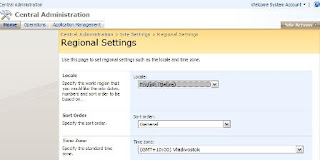
Actually, this is a rather short saga. Today I've been struggling with the fact that WSS 3.0 (this post does not apply to MOSS), by default uses American date formats (MM.dd.YYYY), and that there seemed to be no way to change this. However, I just happened to be wandering through the LAYOUTS folder in the 12 hive (don't ask me what I was doing there) and found a file called regionalsetng.aspx. Turns out, if you open your Central Administration site and alter the path to point to this file (eg http://myserver:12345/_layouts/regionalsetng.aspx), bingo, you get Regional Settings. It is rather bizarre that there appears to be no link to this page from anywhere. Kind of like the mysterious 13 floor on lots of buildings. Or not.

Update: Not sure why this happens, but a regional change made at the top of a Site Collection will not necessarily populate right through the sites below. Sometimes each site must be opened and the regional settings changed there.
Monday, March 09, 2009

Site Collections in MOSS 2007

Been setting up MOSS lately, primarily to serve as a file system replacement. Due to the large volume of files going in, we felt that it just might be a good idea to break the volume of files up into separate site collections. One of the big advantages of creating a separate site collection for each block of files or part of the business is that each site collection, unlike a site, can have its own database on SQL. Site collections can also be recycled and restored independently of each other. The way to tell MOSS to create a site collection with its own database is to use STADM and use a command similar to the following:
stsadm.exe -o createsiteinnewdb -url "http://myMOSSsite/sitecollectionname" -owneremail "owners.email@mycompany.com" -ownerlogin "mydomain\my.superuserlogin" -sitetemplate "thesitetemplate_I_want_to_use#1" -title "MyCollectionName" -databaseserver "mySQLserver\myMOSSinstance" -databasename "WSS_Content_sitecollectionname"

Wednesday, November 12, 2008

Groove and Sharepoint Integration in Office 14

I was talking to someone in the know about the development path that Microsoft's Office suite is heading down, and they let drop a very interesting piece of information. Apparently, in Office 14, the Sharepoint client will be Groove. This makes great sense, and means that document storage and collaboration is starting to get similar tools to mail. I envisage a Outlook style interface for documents that allows for seamless collaboration, dissemination and backup.

Monday, July 07, 2008

Display Sharepoint Custom Columns in Outlook

This little problem has been troubling me for a few days and it appears I am not alone in this. I have a number of Project Task folders, each with very similar or identical tasks within them. For example, multiple folders may have the task "Update spec", assigned to the same person. So when these tasks are synched to Outlook 2007 using the "Connect to Outlook" function in Sharepoint, these identical tasks become indistinguishable. The only way around this appeared to be to expose a custom column that gave the task some context. However, Sharepoint custom columns cannot, it appears be exposed to Outlook, as they do not match the default schema for the object in Outlook (see here for Microsoft's lame explanation).

Found a way around this in the end. This solution has now been in testing for over 5 minutes and so I can conclude it is rock solid (not). Anyway ... Out of the box, Outlook will expose default columns from its own schema. So the answer is to put the context information for the task in a task column in Sharepoint that matches a default one in the Outlook task schema. Pick one that you aren't using for anything else important, perhaps like the Company column. This is called Related Company in Sharepoint. Put the context information in this, and this will be exposed as Company in Outlook. It appears you can then change the name in MOSS and still expose the information in Outlook ... although the name change itself will not be reflected in Outlook. Hope that helps.

Thursday, May 22, 2008

Problems Uploading Documents with Workflow in WSS

I've been working on my first Sharepoint 2007 site. Actually, it's a WSS site as I am not using Sharepoint. The site I have created has very limited functionality, and is intended to allow the company I am working for centrally maintain a register of a certain type of action they are qualified to perform and provide a link to all of the documents related to this action, and WSS is sufficient for this.

So what I have is the Sharepoint equivalent of an Excel spreadsheet (a custom list), which lists the actions and all the associated attributes, and I have a Document Repository, broken into folders. Each document in the Document Repository has two custom attributes - a action type flag and a business unit flag. Each action in the custom list has an action type attribute and a business unit attribute, and when a user selects "Related Documents" from the customised Actions drop down for a list item, Sharepoint does a search in the Document Repository for documents where the business unit and action type flags match the data in the selected action in the custom list.

So far so good. However, to make the experience within Sharepoint similar to what the users are used to and easier, I have made a custom workflow that fires when a new document is created and works out what folder within the Document Repository the new document is being uploaded to. In other words, I am trying to make the document itself explicitly aware of its location, and specifically the folder it is in. Each of the folders in the document repository are named for one of the business units. So the idea is that the document metadata will automatically contain the business unit name that owns the document.

This is where the problem emerges. A user enters the Document Repository, and begins to upload a document. At this point, the workflow fires off. Before the workflow has completed, the screen refreshes to allow the user to edit the metadata for the document, in this case the title, name, action type flag and business unit flag. The metadata displayed is the metadata that the document was uploaded with, but meanwhile, in the background, the workflow has updated the document's business unit flag attribute. The user clicks the check in button, and because the metadata that the document had when the page was rendered and the metadata it has now the workflow is finished is different (irrespective of whether the user entered any changes for these fields), the process errors.

Server Error in '/' Application.
--------------------------------------------------------------------------------

The file Document Repository/
BusinessUnit/Document.JPG has been modified by SHAREPOINT\system on 22 May 2008 11:36:50 +0800.
Description: An unhandled exception occurred during the execution of the current web request. Please review the stack trace for more information about the error and where it originated in the code.

Exception Details: System.Runtime.InteropServices.COMException: The file
Document Repository/BusinessUnit/Document.JPG has been modified by SHAREPOINT\system on 22 May 2008 11:36:50 +0800.

Source Error:

An unhandled exception was generated during the execution of the current web request. Information regarding the origin and location of the exception can be identified using the exception stack trace below.

Stack Trace:


[COMException (0x81020037): The file
Document Repository/BusinessUnit/Document.JPG has been modified by SHAREPOINT\system on 22 May 2008 11:36:50 +0800.]
Microsoft.SharePoint.Library.SPRequestInternalClass.AddOrUpdateItem(String bstrUrl, String bstrListName, Boolean bAdd, Boolean bSystemUpdate, Boolean bPreserveItemVersion, Boolean bUpdateNoVersion, Int32& plID, String& pbstrGuid, Guid pbstrNewDocId, Boolean bHasNewDocId, String bstrVersion, Object& pvarAttachmentNames, Object& pvarAttachmentContents, Object& pvarProperties, Boolean bCheckOut, Boolean bCheckin, Boolean bMigration, Boolean bPublish) +0
Microsoft.SharePoint.Library.SPRequest.AddOrUpdateItem(String bstrUrl, String bstrListName, Boolean bAdd, Boolean bSystemUpdate, Boolean bPreserveItemVersion, Boolean bUpdateNoVersion, Int32& plID, String& pbstrGuid, Guid pbstrNewDocId, Boolean bHasNewDocId, String bstrVersion, Object& pvarAttachmentNames, Object& pvarAttachmentContents, Object& pvarProperties, Boolean bCheckOut, Boolean bCheckin, Boolean bMigration, Boolean bPublish) +199

[SPException: The file
Document Repository/BusinessUnit/Document.JPG has been modified by SHAREPOINT\system on 22 May 2008 11:36:50 +0800.]
Microsoft.SharePoint.Library.SPRequest.AddOrUpdateItem(String bstrUrl, String bstrListName, Boolean bAdd, Boolean bSystemUpdate, Boolean bPreserveItemVersion, Boolean bUpdateNoVersion, Int32& plID, String& pbstrGuid, Guid pbstrNewDocId, Boolean bHasNewDocId, String bstrVersion, Object& pvarAttachmentNames, Object& pvarAttachmentContents, Object& pvarProperties, Boolean bCheckOut, Boolean bCheckin, Boolean bMigration, Boolean bPublish) +240
Microsoft.SharePoint.SPListItem.AddOrUpdateItem(Boolean bAdd, Boolean bSystem, Boolean bPreserveItemVersion, Boolean bNoVersion, Boolean bMigration, Boolean bPublish, Boolean bCheckOut, Boolean bCheckin, Guid newGuidOnAdd, Int32& ulID, Object& objAttachmentNames, Object& objAttachmentContents, Boolean suppressAfterEvents) +933
Microsoft.SharePoint.SPListItem.UpdateInternal(Boolean bSystem, Boolean bPreserveItemVersion, Guid newGuidOnAdd, Boolean bMigration, Boolean bPublish, Boolean bNoVersion, Boolean bCheckOut, Boolean bCheckin, Boolean suppressAfterEvents) +182
Microsoft.SharePoint.SPListItem.UpdateOverwriteVersion() +88
Microsoft.SharePoint.WebControls.SaveButton.SaveItem(SPContext itemContext, Boolean uploadMode, String checkInComment) +178
Microsoft.SharePoint.WebControls.SaveButton.SaveItem() +58
Microsoft.SharePoint.WebControls.SaveButton.OnBubbleEvent(Object source, EventArgs e) +249
System.Web.UI.Control.RaiseBubbleEvent(Object source, EventArgs args) +35
System.Web.UI.WebControls.Button.OnCommand(CommandEventArgs e) +115
System.Web.UI.WebControls.Button.RaisePostBackEvent(String eventArgument) +163
System.Web.UI.WebControls.Button.System.Web.UI.IPostBackEventHandler.RaisePostBackEvent(String eventArgument) +7
System.Web.UI.Page.RaisePostBackEvent(IPostBackEventHandler sourceControl, String eventArgument) +11
System.Web.UI.Page.RaisePostBackEvent(NameValueCollection postData) +177
System.Web.UI.Page.ProcessRequestMain(Boolean includeStagesBeforeAsyncPoint, Boolean includeStagesAfterAsyncPoint) +1746
Not good, huh!

Anyway, it turns out this is a fairly well known problem (even though Googling the error doesn't come up with much). Two good posts that started to lead me in the right direction are here and here. It turns out, that for me, the solution was as easy as making sure I had a mandatory or required field/column with no default value entered for the uploaded documents. The workflow would then have to wait until the user entered the requisite information and checked the document in, before firing. Problem solved.